# TikTok LIVE Studio Local Data Access — Complete Context
> Complete English implementation context for the local WebSocket protocol, public events, samples, troubleshooting, and the cross-stack Agent Skill.
Protocol version: `1.0.0`. This file is generated from the documentation and Agent Skill sources in the GitHub repository. Do not edit it manually.
https://tiktok-live-studio-local-data-access.pages.dev/guide/overviewdocs/guide/overview.md
# Overview
LIVE Studio Local Data Access exposes selected live room events from the creator machine to trusted local third-party clients.
LIVE Studio provides a local WebSocket endpoint on the creator machine. A third-party client connects to that endpoint, authenticates with an issued credential, and then receives real-time event messages.
## What it enables
- Local H5 tools can react to likes, gifts, and chat messages.
- Unity or native game clients can consume live room events without embedding into LIVE Studio.
- Developer tools can listen to a stable JSON protocol for debugging or automation.
## What it does not enable
- It does not push personalized state to viewer devices.
- It does not make the livestream video per-viewer.
- It does not expose a remote cloud API.
- It does not bypass application allowlist or event allowlist policy.
## Current public events
| Event | Description |
| --- | --- |
| `live.like` | Live room like message |
| `live.gift` | Live room gift message |
| `live.chat` | Live room text chat message |
## Integration model
```mermaid
flowchart LR
subgraph CreatorMachine[Creator machine]
Studio[LIVE Studio]
Client[Local third-party client]
end
Studio -->|WebSocket /v1/third-party| Client
```
The endpoint is local-only. Clients must connect to `127.0.0.1` and complete authentication before receiving events.
---
https://tiktok-live-studio-local-data-access.pages.dev/demos/docs/demos/index.md
INTERACTIONS IN ACTION
See what the room can play.
Try two games with simulated likes, gifts, and chat—no account or credentials needed. Then see a recorded tower-defense experience inside LIVE Studio.
[Tug of Trap](https://tiktok-live-studio-local-data-access.pages.dev/demos/tug-of-trap) · [Candy Arena](https://tiktok-live-studio-local-data-access.pages.dev/demos/candy-arena-duel). Public demo mode uses simulated events.
[View resource](https://tiktok-live-studio-local-data-access.pages.dev/demos/tower-defense)
VIDEO CASE · NOT A PLAYABLE DEMO
Tower Defense × LIVE Studio
Watch a gift become a tower and change the round. A recorded example of audience interaction becoming an on-screen game action.
[Watch the case study →](https://tiktok-live-studio-local-data-access.pages.dev/demos/tower-defense)
Ready to use real events? [Apply for access](https://tiktok-live-studio-local-data-access.pages.dev/apply), or follow the [Quick Start](https://tiktok-live-studio-local-data-access.pages.dev/guide/quick-start) if already approved. Public demo mode does not connect to your live room.
---
https://tiktok-live-studio-local-data-access.pages.dev/demos/tug-of-trapdocs/demos/tug-of-trap.md
# Tug of Trap
**A room-wide team battle built with Vite, TypeScript, and PixiJS.** Viewers choose blue or red, build pulling power together, and use gifts to protect their team or disrupt the other side.
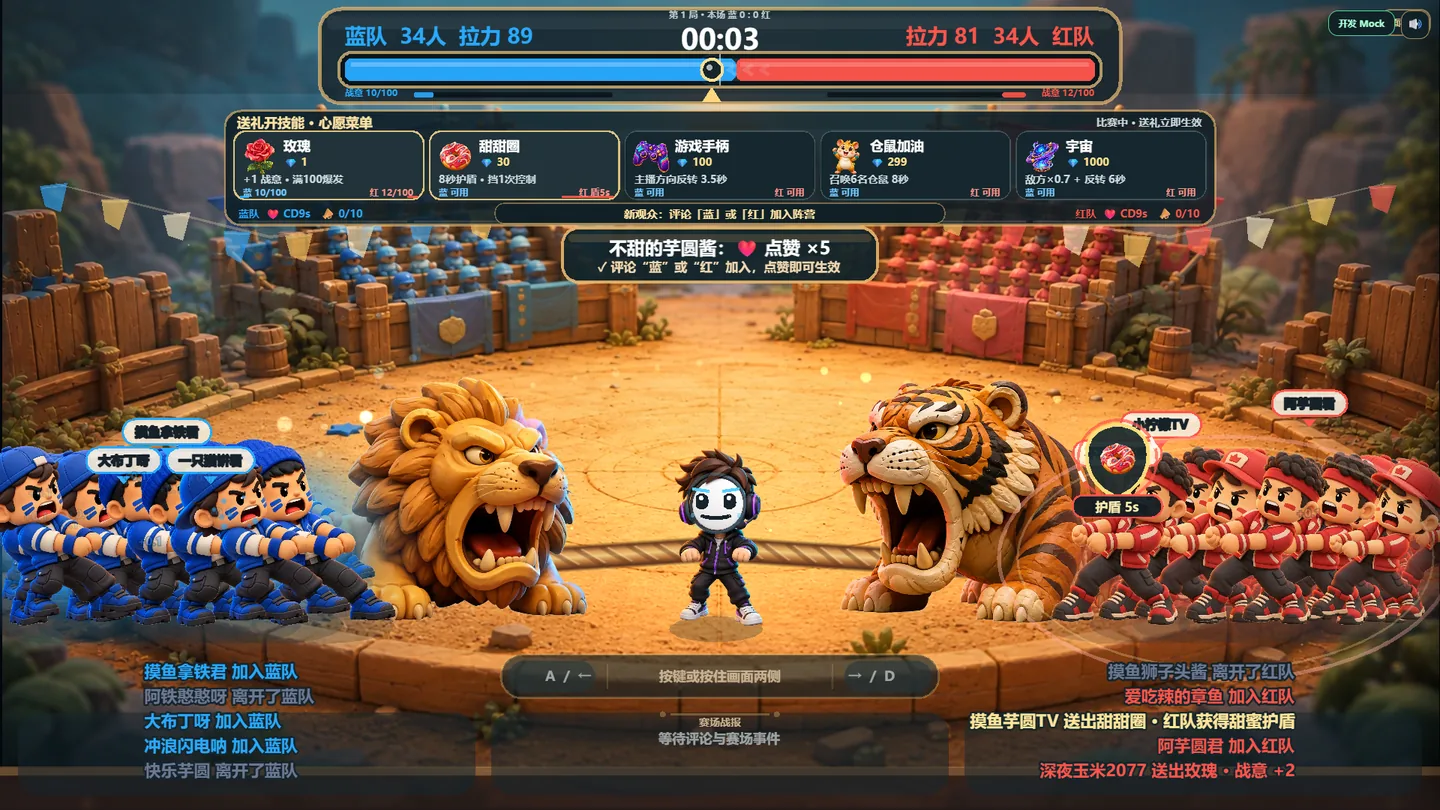
[Try simulated demo ↗](https://liangpeiran-bit.github.io/playable_interaction_game/?demo=1)
[Build with the API](https://tiktok-live-studio-local-data-access.pages.dev/guide/quick-start)
FORMATTeam competition
STACKPixiJS + TypeScript
PUBLIC EVENTSLike · Gift · Chat
DELIVERYLocal WebSocket
## From event stream to tug-of-war
```mermaid
flowchart LR
A[live.chat] --> B[Choose blue or red]
C[live.like] --> D[Strength and morale]
E[live.gift] --> F[Team skill]
B --> G[Tug-of-war rules]
D --> G
F --> G
G --> H[Characters, rope, VFX and result]
```
| Event | Game mapping | Stability rule |
| --- | --- | --- |
| `live.chat` | Select a team; recognized cheers build team actions | Team is locked for the current round; chat commands have cooldowns |
| `live.like` | Strengthens the viewer's unit; each 100-like milestone launches a team wave | Uses cumulative milestones instead of one effect per raw message |
| `live.gift` | Triggers a named tactical skill for the selected team | Matches `gift.id`, handles combo deltas, and queues pre-round gifts |
## Gift design
| Gift ID | Gift | Effect |
| --- | --- | --- |
| `5655` | Rose | +1 team morale |
| `5879` | Doughnut | Shield for 8 seconds; blocks one controller reversal |
| `7569` | Game Controller | Reverses creator controls for 3.5 seconds |
| `17358` | Hamster | Adds six visible helpers for 8 seconds |
| `11046` | Universe | Reduces opposing pull to 70% and reverses controls for 6 seconds |
Gifts received before a viewer chooses a team wait briefly for ownership; unresolved gifts join the smaller real-player team. Effects are capped, cooled down, or converted to morale instead of stacking without limit.
## How it was built
1. **Prove the game loop.** A deterministic tug simulation established team force, rope position, round states, and victory before live data was connected.
2. **Add the protocol boundary.** Port discovery, `SERVER_HELLO` validation, authentication, heartbeat, deduplication, and reconnection were isolated from the PixiJS scene.
3. **Turn events into fair rules.** Team selection, like milestones, cheer windows, gift ownership, combo handling, and cross-round queues were added as testable domain logic.
4. **Raise presentation quality.** The flat prototype evolved into a 3D toy-diorama style with readable blue/red states, character reactions, gift VFX, MVP, streaks, and result choreography.
5. **Create a public path.** `?demo=1` uses clearly labeled simulated interactions; the real mode continues to require LIVE Studio and in-memory credentials.
## Gameplay states
[Image](https://tiktok-live-studio-local-data-access.pages.dev/media/demos/tug-of-trap-rally.webp)Coordinated chat creates a timed Rally Sprint.[Image](https://tiktok-live-studio-local-data-access.pages.dev/media/demos/tug-of-trap-universe.webp)The Universe gift changes force, controls, lighting, and status UI together.
## Engineering takeaways
- The browser never assumes a fixed port; it discovers `127.0.0.1:49152-65535` and validates the hello before authenticating.
- Credentials stay in memory. Public demo mode does not ask for or persist them.
- The event adapter produces domain commands. Rendering code never parses raw protocol payloads.
- Bounded queues, cooldowns, deduplication, and round cleanup prevent event bursts from corrupting the match.
- The public deployment contains the playable build; the development repository can remain private.
Next: [inspect the event contracts](https://tiktok-live-studio-local-data-access.pages.dev/protocol/events) or [apply for access](https://tiktok-live-studio-local-data-access.pages.dev/apply).
---
https://tiktok-live-studio-local-data-access.pages.dev/demos/candy-arena-dueldocs/demos/candy-arena-duel.md
# Candy Arena
**A creator-controlled rhythm duel built with React, Phaser, and a deterministic TypeScript battle engine.** The creator plays the core combat loop; the audience contributes energy, assists, and direct gift skills.
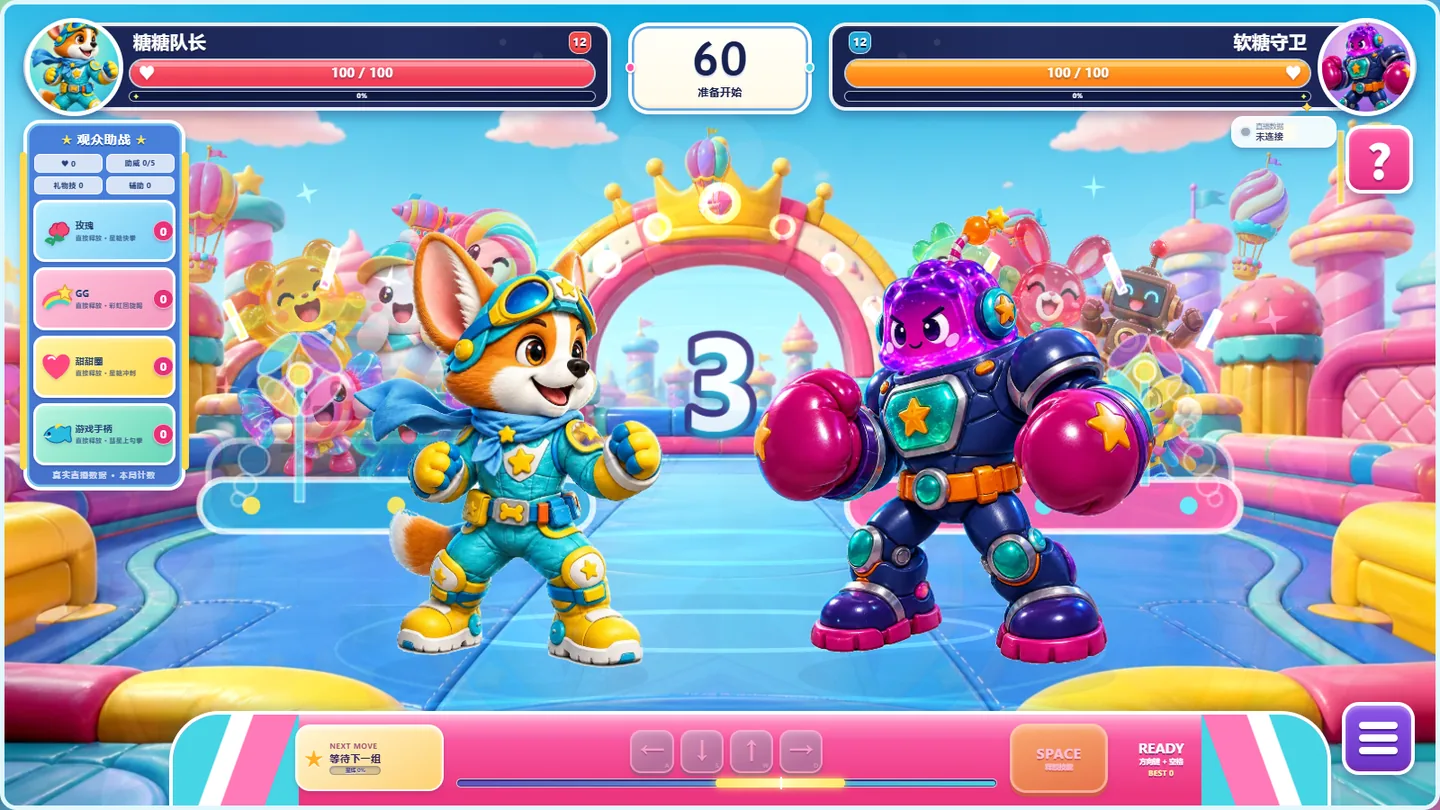
[Try simulated demo ↗](https://liangpeiran-bit.github.io/candy-arena-duel/?demo=1)
[Read the web sample](https://tiktok-live-studio-local-data-access.pages.dev/samples/javascript)
FORMATRhythm combat
STACKReact + Phaser
INPUTKeyboard + LIVE events
QUALITYUnit + E2E coverage
## Two inputs, one battle engine
```mermaid
flowchart LR
A[Creator rhythm and dodge] --> D[Deterministic battle engine]
B[live.like and live.chat] --> C[Bounded audience assists]
E[live.gift] --> F[Queued named attacks]
C --> D
F --> D
D --> G[React HUD + Phaser scene + audio]
```
| Input | Game mapping | Boundary |
| --- | --- | --- |
| Creator controls | Direction sequence, beat confirmation, and active dodge | Remains the primary way to win the duel |
| `live.like` | Every 100 likes adds 2 hero energy | 20 energy maximum per round |
| `live.chat` | Five distinct cheers within 15 seconds award one assist | Identity window and per-round storage cap |
| `live.gift` | Bypasses rhythm input and directly queues an existing hero attack | Strict ID matching, combo-delta handling, bounded TTL queue |
## Gifts reuse the combat system
| Gift ID | Gift | Existing move triggered |
| --- | --- | --- |
| `5655` | Rose | Star Jab |
| `6064` | GG | Rainbow Kick |
| `5487` | Finger Heart | Comet Uppercut |
| `5879` | Doughnut | Star Dash |
| `7569` | Game Controller | Comet Uppercut |
| `11046` | Universe | Galaxy Candy Storm |
The integration does not maintain a second gift-only combat model. Gift events enter the same attack queue, animation state machine, hit timing, VFX, and sound path as creator-triggered moves.
## How it was built
1. **Translate the visual target into a playable loop.** React owns HUD and controls; Phaser owns the arena, characters, camera, and effects.
2. **Make combat deterministic.** A fixed-step engine separates damage and timing from rendering, making the duel reproducible and testable.
3. **Add creator skill.** Direction sequences, beat grades, combo, ultimate energy, and active dodge keep the game playable without live events.
4. **Connect Local Data Access.** The client scans the dynamic loopback range, authenticates, normalizes public events, and routes them through a dedicated interaction controller.
5. **Iterate presentation and quality.** Character poses, arena depth, audience animation, gift-specific VFX, audio, responsive layout, texture checks, unit tests, and multi-resolution E2E checks were added incrementally.
6. **Separate public demo from real access.** `?demo=1` skips credentials and emits labeled simulated events; the default URL preserves the real LIVE Studio connection gate.
## Combat presentation
[Image](https://tiktok-live-studio-local-data-access.pages.dev/media/demos/candy-arena-gift.webp)A Universe event enters the existing ultimate skill path.[Image](https://tiktok-live-studio-local-data-access.pages.dev/media/demos/candy-arena-ultimate.webp)Attack state, camera, character pose, particles, and audio resolve together.
## Engineering takeaways
- React and Phaser communicate through the battle engine instead of mutating each other's state.
- The live controller owns cheer windows, like milestones, gift combo deltas, queues, and broadcast text.
- Broken or unknown events do not interrupt the fight; reconnect behavior is independent of battle time.
- Startup credentials are removed from the DOM after submission and never enter URL or Web Storage.
- Public demo mode is explicit and simulated. It cannot be confused with a successful live-room connection.
Next: [implement the JavaScript client](https://tiktok-live-studio-local-data-access.pages.dev/samples/javascript) or [browse the gift catalog](https://tiktok-live-studio-local-data-access.pages.dev/reference/gift-catalog).
---
https://tiktok-live-studio-local-data-access.pages.dev/demos/tower-defensedocs/demos/tower-defense.md
# Tower Defense × LIVE Studio
A recorded interaction case: a gift becomes a tower and changes the round inside LIVE Studio. This is a video, not a playable demo or a downloadable game project.
[Open the recording](https://tiktok-live-studio-local-data-access.pages.dev/media/interactive-tower-defense-demo.mp4).
## Bring the pattern to your game
| Audience input | Game responsibility |
| --- | --- |
| A gift event arrives | Match the string `payload.gift.id` to your chosen rule. |
| The chosen trigger condition is met | Spawn a tower or run another action your game defines. |
| An unknown gift arrives | Ignore it or use an explicit fallback; keep the connection open. |
The recording illustrates the interaction, not a specification of its internal implementation. To build a similar effect, start with [live.gift](https://tiktok-live-studio-local-data-access.pages.dev/events/live-gift) and the [Gift Catalog](https://tiktok-live-studio-local-data-access.pages.dev/reference/gift-catalog). Decide your combo policy before attaching an expensive action.
For a hands-on simulation, try [Tug of Trap](https://tiktok-live-studio-local-data-access.pages.dev/demos/tug-of-trap) or [Candy Arena](https://tiktok-live-studio-local-data-access.pages.dev/demos/candy-arena-duel). To receive real events, follow [Quick Start](https://tiktok-live-studio-local-data-access.pages.dev/guide/quick-start).
---
https://tiktok-live-studio-local-data-access.pages.dev/guide/quick-startdocs/guide/quick-start.md
# Quick Start
The goal is one authenticated connection and one real event. You do not need to build a game first.
## 1. Check your access
**Not approved yet?** [Apply for access](https://tiktok-live-studio-local-data-access.pages.dev/apply). You can explore [simulated demos](https://tiktok-live-studio-local-data-access.pages.dev/demos/) while waiting; they do not grant access to real live-room data.
**Already approved?** Have these ready:
- LIVE Studio running on the **same machine** as your client.
- The installation and account enabled for local data access, as described in your approval email.
- Your issued `app_id`, `key_id`, and `secret`.
There is no verified public minimum LIVE Studio build listed here yet. Use the setup instructions supplied with your approval; updating LIVE Studio alone does not enable access. If those instructions or credentials are missing, email [TikTok_LIVE_Studio_Office@bytedance.com](mailto:TikTok_LIVE_Studio_Office@bytedance.com).
## 2. Run the local starter
Follow [H5: runnable starter](https://tiktok-live-studio-local-data-access.pages.dev/samples/h5) to download three small files and launch them on `127.0.0.1`. It requires Node.js 22+ for the local preview server and a browser that permits local WebSocket access.
Enter your credentials at runtime, then select **Connect**. Do not enter credentials on public demo pages or put them in downloaded source files.
Expected status:
```text
SCANNING → AUTHENTICATING → AUTHENTICATED
```
The client scans `49152–65535` in bounded batches, verifies `SERVER_HELLO`, and sends `AUTH`. **AUTHENTICATED** appears only after `AUTH_RESULT.success=true`.
## 3. Receive the first event
With a live room active, generate an interaction for a message type enabled on your application. Start with a like or comment if enabled; a gift purchase is not required to test the connection.
The local log will show, for example:
```text
EVENT live.like
```
This is expected output, not a simulated event injected by the starter. An idle live room may produce no events, and authentication does not enable every message type.
| What you see | What to check |
| --- | --- |
| `ENDPOINT_NOT_FOUND` | Same machine, enabled LIVE Studio installation/account, and browser local-network policy. |
| `INVALID_CREDENTIALS` or `ACCESS_DISABLED` | Issued credentials and application configuration; do not retry in a tight loop. |
| `AUTHENTICATED`, but no event | Active room, a new interaction, and the enabled IM message types. |
| `POLICY_DISCONNECT_510` | Access policy changed. Stop and confirm access before reconnecting. |
More checks: [Troubleshooting](https://tiktok-live-studio-local-data-access.pages.dev/guide/troubleshooting).
## 4. Make it your game
Choose an [event](https://tiktok-live-studio-local-data-access.pages.dev/events/) and connect its handler to a game action. For gifts, copy a string ID from the [Gift Catalog](https://tiktok-live-studio-local-data-access.pages.dev/reference/gift-catalog#browse-gifts) and choose when a combo triggers the effect.
Keep transport separate from game rules. The starter has manual reconnect, not production retry logic; each new connection must rediscover and authenticate. For production, add cancellable backoff as described in [Connection lifecycle](https://tiktok-live-studio-local-data-access.pages.dev/protocol/connection).
Prefer to work with an agent? [Install the Agent Skill](https://tiktok-live-studio-local-data-access.pages.dev/guide/agent-skill), or give it [llms.txt](https://tiktok-live-studio-local-data-access.pages.dev/llms.txt). For Unity, use the [integration guide](https://tiktok-live-studio-local-data-access.pages.dev/samples/unity).
::: warning Credential handling
Never log or upload the secret, embed it in a public bundle, or commit it to a repository. This starter keeps it in memory. A packaged client should use its trusted runtime credential mechanism or an OS secret store, not plaintext project files.
:::
---
https://tiktok-live-studio-local-data-access.pages.dev/guide/architecturedocs/guide/architecture.md
# Architecture
LIVE Studio Local Data Access is a local WebSocket service on the creator machine. A third-party client discovers the endpoint, authenticates with issued credentials, and then receives live room events.
## Deployment model
```mermaid
flowchart LR
subgraph CreatorMachine[Creator machine]
Studio[LIVE Studio]
Client[Third-party client]
end
Studio -->|"ws://127.0.0.1:49152-65535/v1/third-party"| Client
```
The service accepts connections on loopback only. Clients must connect to `127.0.0.1`. Remote hosts cannot reach this endpoint.
## Client flow
```mermaid
flowchart TD
Scan[Bounded parallel scan 127.0.0.1:49152-65535]
Hello[Validate SERVER_HELLO]
Auth[Send AUTH]
Result{AUTH_RESULT}
Events[Receive EVENT]
Closed[Connection closed]
Scan --> Hello
Hello --> Auth
Auth --> Result
Result -->|success=true| Events
Result -->|success=false| Closed
Events --> Closed
Closed --> Scan
```
After a disconnect, authentication state is gone. A new connection must repeat discovery, `SERVER_HELLO` validation, and `AUTH`.
## Endpoint
| Field | Value |
| --- | --- |
| Host | `127.0.0.1` |
| Port range | `49152` to `65535` |
| Path | `/v1/third-party` |
| Protocol version | `1.0.0` |
LIVE Studio probes from `49152` upward and binds the first available port. The actual port may change after restart. Scan candidate URLs in bounded parallel batches until one returns a valid `SERVER_HELLO`; do not hard-code a port or open the entire range at once.
## Access rules
A client can receive events only when all of the following are true:
- Local data access is enabled for the current LIVE Studio environment.
- The issued `app_id`, `key_id`, and `secret` are valid.
- The event is enabled for that application.
- The connection is within the allowed total and per-app limits.
If access is later disabled, credentials are revoked, or limits change, the server may send `DISCONNECT` with `reason_code=510` and close the socket.
## Protocol messages
| Message | Direction | When it appears |
| --- | --- | --- |
| `SERVER_HELLO` | Server to client | Immediately after the WebSocket opens |
| `AUTH` | Client to server | First client JSON message |
| `AUTH_RESULT` | Server to client | After authentication succeeds or fails |
| `EVENT` | Server to client | After authentication succeeds |
| `DISCONNECT` | Server to client | Before an intentional close, when applicable |
See [Connection Lifecycle](https://tiktok-live-studio-local-data-access.pages.dev/protocol/connection) and [Authentication](https://tiktok-live-studio-local-data-access.pages.dev/protocol/auth) for field-level details.
---
https://tiktok-live-studio-local-data-access.pages.dev/protocol/connectiondocs/protocol/connection.md
# Connection Lifecycle
Third-party clients connect to LIVE Studio through a local WebSocket endpoint.
## Endpoint
| Field | Value |
| --- | --- |
| Host | `127.0.0.1` |
| Port range | `49152` to `65535` |
| Path | `/v1/third-party` |
| Protocol version | `1.0.0` |
Full URL:
```txt
ws://127.0.0.1:{port}/v1/third-party
```
## Discovery flow
```mermaid
sequenceDiagram
participant C as Client
participant B as Candidate batch
loop 49152 to 65535 in bounded batches
C->>B: Open a small parallel batch
B-->>C: Failure, timeout, or first message
C->>C: Validate every SERVER_HELLO
alt a valid hello is found
C->>B: Close all losing sockets
C->>C: Keep the verified socket and stop
else no valid hello
C->>C: Scan the next batch
end
end
```
LIVE Studio probes this range from low to high and binds the first available port. The selected port can change after restart, so clients must discover it rather than hard-code or permanently cache it.
The range contains 16,384 candidates. Scan in small, bounded parallel batches, close losing sockets, and validate `SERVER_HELLO` before sending credentials. A port that does not return a valid hello must be treated as unrelated. Never open the entire range at once.
## State machine
```mermaid
stateDiagram-v2
[*] --> Scanning
Scanning --> WaitingHello: WebSocket opens
WaitingHello --> Scanning: failure / timeout / invalid hello
WaitingHello --> Authenticating: valid hello, send AUTH
Authenticating --> Authenticated: AUTH_RESULT success=true
Authenticating --> Closed: auth failed or timed out
Authenticated --> Authenticated: receive EVENT
Authenticated --> Closed: disconnect / close / transport error
Closed --> [*]
```
## Timeouts and heartbeat
| Setting | Value |
| --- | --- |
| Authentication timeout | 20 seconds |
| WebSocket ping interval | 30 seconds |
The protocol uses native WebSocket ping/pong. It does not define a JSON `HEARTBEAT` message.
## Reconnection
When a connection closes, its authentication state is gone. A new WebSocket must repeat:
1. Port discovery
2. `SERVER_HELLO` validation
3. `AUTH`
4. `AUTH_RESULT` handling
Use reconnect backoff to avoid hitting connection limits during policy or network failures.
---
https://tiktok-live-studio-local-data-access.pages.dev/protocol/authdocs/protocol/auth.md
# Authentication
Authentication is required before a third-party client can receive events.
## Message order
```mermaid
sequenceDiagram
participant C as Client
participant S as LIVE Studio
C->>S: WebSocket connect
S-->>C: SERVER_HELLO
C->>C: Validate hello
C->>S: AUTH
alt accepted
S-->>C: AUTH_RESULT success=true
S-->>C: EVENT...
else rejected
S-->>C: AUTH_RESULT success=false
S-->>C: Close
end
```
The client must send `AUTH` as the first JSON message after validating `SERVER_HELLO`.
## `SERVER_HELLO`
Direction: server to client.
Sent immediately after WebSocket connection.
| Field | Type | Required | Description |
| --- | --- | --- | --- |
| `type` | string | Yes | Always `SERVER_HELLO` |
| `product` | string | Yes | Always `tiktok_live_studio` |
| `channel` | string | Yes | Always `third-party-im` |
| `version` | string | Yes | Server protocol version |
```json
{
"type": "SERVER_HELLO",
"product": "tiktok_live_studio",
"channel": "third-party-im",
"version": "1.0.0"
}
```
## `AUTH`
Direction: client to server.
Must be the first client JSON message.
| Field | Type | Required | Description |
| --- | --- | --- | --- |
| `type` | string | Yes | Always `AUTH` |
| `app_id` | string | Yes | Issued application identifier |
| `key_id` | string | Yes | Issued key version identifier |
| `secret` | string | Yes | Raw application secret |
| `version` | string | No | Client protocol version |
```json
{
"type": "AUTH",
"app_id": "your_app_id",
"key_id": "your_key_id",
"secret": "your_secret",
"version": "1.0.0"
}
```
::: warning
Send the raw `secret`. Do not hash or transform it on the client side.
:::
## `AUTH_RESULT`
Direction: server to client.
Sent after authentication succeeds or fails.
| Field | Type | Required | Description |
| --- | --- | --- | --- |
| `type` | string | Yes | Always `AUTH_RESULT` |
| `success` | boolean | Yes | Whether authentication succeeded |
| `app_id` | string | Yes | Application identifier parsed from the request |
| `app_name` | string | No | Application display name when available |
| `message` | string | Yes | Human-readable result |
| `server_time` | number | Yes | Unix timestamp in milliseconds |
| `version` | string | Yes | Server protocol version |
| `error_code` | string | No | Present when authentication fails |
Success:
```json
{
"type": "AUTH_RESULT",
"success": true,
"app_id": "your_app_id",
"app_name": "Example App",
"message": "Authentication successful",
"server_time": 1786010400000,
"version": "1.0.0"
}
```
Failure:
```json
{
"type": "AUTH_RESULT",
"success": false,
"app_id": "your_app_id",
"message": "Invalid credentials",
"server_time": 1786010400000,
"version": "1.0.0",
"error_code": "INVALID_CREDENTIALS"
}
```
## Policy checks
Authentication succeeds only when all checks pass:
- Local data access is enabled.
- `app_id` exists in the allowlist.
- `key_id` matches the configured key.
- `secret` matches the issued credential.
- Total connection count is below the policy limit.
- Per-app connection count is below the policy limit.
---
https://tiktok-live-studio-local-data-access.pages.dev/protocol/eventsdocs/protocol/events.md
# Event Envelope
After authentication succeeds, LIVE Studio sends public live room events using the `EVENT` envelope.
## Envelope shape
| Field | Type | Required | Description |
| --- | --- | --- | --- |
| `type` | string | Yes | Always `EVENT` |
| `event` | string | Yes | Public event name |
| `timestamp` | number | Yes | Unix timestamp in milliseconds |
| `payload` | object | Yes | Event-specific payload |
```json
{
"type": "EVENT",
"event": "live.like",
"timestamp": 1786010400000,
"payload": {
"message_id": "7520000000000000001"
}
}
```
## Public user object
Some event payloads include a `user` object. The object itself and all fields inside it should be treated as optional.
| Field | Type | Required | Description |
| --- | --- | --- | --- |
| `id` | string | No | User identifier |
| `nickname` | string | No | Display nickname |
| `display_id` | string | No | Public display ID |
| `avatar_url` | string | No | Avatar URL |
Example:
```json
{
"id": "7300000000000000000",
"nickname": "Viewer",
"display_id": "viewer_01",
"avatar_url": "https://example.invalid/avatar.png"
}
```
## Deduplication
When a payload includes `message_id`, use it as the primary deduplication key.
Recommended key:
```txt
{event}:{message_id}
```
## Optional fields
Clients should not assume every field is present. LIVE Studio may omit unavailable fields, or provide safe fallback values such as an empty string or `0`.
Recommended handling:
- Treat `user` as optional.
- Treat unknown event names as unsupported and ignore them.
- Tolerate unknown enum values.
- Avoid failing the entire connection because one event payload is missing an optional field.
---
https://tiktok-live-studio-local-data-access.pages.dev/protocol/errorsdocs/protocol/errors.md
# Errors and Disconnects
This page lists authentication errors and application-level disconnect reasons.
## Authentication errors
Authentication failures are returned in `AUTH_RESULT.error_code`.
| `error_code` | Meaning | Common cause |
| --- | --- | --- |
| `INVALID_FORMAT` | Invalid authentication message | Invalid JSON, missing `type`, first client message is not `AUTH`, or missing `app_id`, `key_id`, or `secret` |
| `ACCESS_DISABLED` | Local data access is disabled | The local data access policy is not enabled |
| `INVALID_CREDENTIALS` | Credential mismatch | App is not allowlisted, `key_id` is wrong, or `secret` does not match |
| `CONNECTION_LIMIT` | Connection limit reached | Total or per-app connection quota exceeded |
| `AUTH_TIMEOUT` | Authentication timed out | Client did not send a valid `AUTH` within 20 seconds |
| `SERVER_ERROR` | Internal server error | Unexpected local gateway error |
## Disconnect message
When LIVE Studio intentionally terminates an authenticated connection, it may send `DISCONNECT` before closing the WebSocket.
| Field | Type | Required | Description |
| --- | --- | --- | --- |
| `type` | string | Yes | Always `DISCONNECT` |
| `app_id` | string | Yes | Authenticated application identifier |
| `reason_code` | number | Yes | Application-level reason code |
| `reason` | string | Yes | Human-readable reason |
| `timestamp` | number | Yes | Unix timestamp in milliseconds |
```json
{
"type": "DISCONNECT",
"app_id": "your_app_id",
"reason_code": 510,
"reason": "Application access policy changed",
"timestamp": 1786010400000
}
```
## Disconnect reason codes
| `reason_code` | Name | Description |
| --- | --- | --- |
| `100` | `UserInitiated` | Server received an intentional stop request |
| `200` | `PeerClosed` | Peer already closed the socket |
| `201` | `ClientError` | Client-side transport or message error |
| `300` | `HeartbeatTimeout` | Server did not receive WebSocket pong |
| `400` | `AuthFailed` | Authentication failed |
| `500` | `ServerShutdown` | LIVE Studio local event service is stopping |
| `510` | `AccessPolicyChanged` | Access disabled, credential revoked, allowlist changed, or quota policy changed |
## Client behavior
- Use `error_code` for authentication failure branching.
- Use `reason_code` for disconnect handling.
- Do not parse `message` or `reason` as the only programmatic signal.
- Re-run service discovery and authentication for a new connection.
- Apply reconnect backoff after repeated failures.
---
https://tiktok-live-studio-local-data-access.pages.dev/events/live-likedocs/events/live-like.md
# `live.like`
`live.like` represents a live room like message.
Events without a valid `message_id` are not delivered.
## Payload
| Field | Type | Required | Description |
| --- | --- | --- | --- |
| `message_id` | string | Yes | Unique message identifier for deduplication |
| `room_id` | string | Yes | Live room identifier, or empty string when unavailable |
| `count` | string | Yes | Like count carried by this message, or empty string when unavailable |
| `total` | string | Yes | Accumulated like count, or empty string when unavailable |
| `user` | object | No | Public user object |
## Example
```json
{
"type": "EVENT",
"event": "live.like",
"timestamp": 1786010400000,
"payload": {
"message_id": "7520000000000000001",
"room_id": "7520000000000000000",
"count": "15",
"total": "8432",
"user": {
"id": "7300000000000000000",
"nickname": "Viewer",
"display_id": "viewer_01",
"avatar_url": "https://example.invalid/avatar.png"
}
}
}
```
## Client notes
- Treat `count` and `total` as strings.
- Use `message_id` for deduplication.
- The `user` object may be absent.
---
https://tiktok-live-studio-local-data-access.pages.dev/events/docs/events/index.md
# Choose an event
Start with what you want the audience to change. Your authenticated client receives the IM message types enabled for its application; it does not need to send a subscription list.
| Event | Useful for | Handle carefully |
| --- | --- | --- |
| [live.like](https://tiktok-live-studio-local-data-access.pages.dev/events/live-like) | Team energy, progress, shared goals | `count` and `total` are strings; validate before arithmetic. |
| [live.gift](https://tiktok-live-studio-local-data-access.pages.dev/events/live-gift) | A chosen gift triggers a specific skill or object | Match `gift.id`, not names. Choose a combo policy. |
| [live.chat](https://tiktok-live-studio-local-data-access.pages.dev/events/live-chat) | Team selection, commands, audience votes | Render `content` as plain text. |
All three use the same [event envelope](https://tiktok-live-studio-local-data-access.pages.dev/protocol/events). Deduplicate by event type and `message_id`; the `user` object may be absent.
## Pick a gift, then pick its effect
Use the [Gift Catalog](https://tiktok-live-studio-local-data-access.pages.dev/reference/gift-catalog#browse-gifts) to copy an ID into your game's configuration. The Gateway delivers the event; your game owns the rules. Unknown gift IDs should not disconnect your client.
## Not receiving an event?
Authentication success does not mean every message type is enabled. Confirm the application configuration and generate a new interaction in a test live room. See [Troubleshooting](https://tiktok-live-studio-local-data-access.pages.dev/guide/troubleshooting).
---
https://tiktok-live-studio-local-data-access.pages.dev/events/live-giftdocs/events/live-gift.md
# `live.gift`
`live.gift` represents a live room gift message.
## Payload
| Field | Type | Required | Description |
| --- | --- | --- | --- |
| `message_id` | string | Yes | Unique message identifier for deduplication |
| `room_id` | string | Yes | Live room identifier, or empty string when unavailable |
| `gift` | object | Yes | Gift information |
| `group_id` | string | Yes | Gift group identifier, or empty string when unavailable |
| `group_count` | string | Yes | Gift group count, or empty string when unavailable |
| `repeat_count` | string | Yes | Repeat count, or empty string when unavailable |
| `combo_count` | string | Yes | Combo count, or empty string when unavailable |
| `repeat_end` | boolean | Yes | Whether the repeat or combo sequence has ended |
| `user` | object | No | Public user object |
## Gift object
| Field | Type | Required | Description |
| --- | --- | --- | --- |
| `id` | string | Yes | Gift identifier |
| `name` | string | Yes | Gift name, or empty string when unavailable |
| `type` | number | Yes | Gift type enum value, or `0` when unavailable |
| `diamond_count` | number | Yes | Diamond value per gift, or `0` when unavailable |
| `image_url` | string | Yes | Gift image URL, or empty string when unavailable |
## Example
```json
{
"type": "EVENT",
"event": "live.gift",
"timestamp": 1786010400000,
"payload": {
"message_id": "7520000000000000002",
"room_id": "7520000000000000000",
"gift": {
"id": "5655",
"name": "Rose",
"type": 1,
"diamond_count": 1,
"image_url": "https://example.invalid/gift.png"
},
"group_id": "group_001",
"group_count": "1",
"repeat_count": "3",
"combo_count": "3",
"repeat_end": true,
"user": {
"id": "7300000000000000000",
"nickname": "Viewer",
"display_id": "viewer_01",
"avatar_url": "https://example.invalid/avatar.png"
}
}
}
```
## Client notes
- Treat count fields as strings.
- Tolerate unknown gift `type` values.
- Use `repeat_end` to finalize combo presentation when needed.
- The `user` object may be absent.
## Choose a gift and trigger an effect
Use the searchable [Gift Catalog](https://tiktok-live-studio-local-data-access.pages.dev/reference/gift-catalog) or its [machine-readable JSON](https://tiktok-live-studio-local-data-access.pages.dev/data/gifts.json) to find an ID. Store gift-to-effect rules in application configuration and match the string value of `payload.gift.id`.
```ts
const effectByGiftId = new Map([
['5655', 'drop-rose'],
['6064', 'show-gg'],
['7569', 'controller-boost']
])
function onGift(payload: LiveGiftPayload) {
const effect = effectByGiftId.get(String(payload.gift.id))
if (!effect || !payload.repeat_end) return
runEffect(effect, payload)
}
```
Do not match by `gift.name`: names may be localized and different IDs can have the same name. Do not match by `diamond_count` either, because value and availability can change. Treat the catalog as an authoring snapshot and the incoming event as the runtime source of truth.
For immediate, combo-end, and per-unit trigger policies, see [Gift Catalog: Choose a trigger policy](https://tiktok-live-studio-local-data-access.pages.dev/reference/gift-catalog#choose-a-trigger-policy).
---
https://tiktok-live-studio-local-data-access.pages.dev/reference/gift-catalogdocs/reference/gift-catalog.md
# Gift Catalog
Use this catalog to find a gift ID, then map that ID to an effect in your app or game. The page supports searching by gift name or ID, sorting by diamond value, and copying the selected ID.
::: warning Point-in-time snapshot
This catalog was extracted from a CN gift-panel response captured on September 4, 2026. It contains 608 unique IDs; 348 were displayed in that panel response. The source response reports `is_full_gift_data=false`, so this is not a permanent global allowlist. Availability, names, prices, and images can change by region, room, account, campaign, and time.
:::
- [Machine-readable JSON](https://tiktok-live-studio-local-data-access.pages.dev/data/gifts.json)
- [CSV download](https://tiktok-live-studio-local-data-access.pages.dev/data/gifts.csv)
English search aliases cover the examples **Rose**, **GG**, and **Game Controller**. Other names retain the source language; use the ID if a translated name is not found. [Download search aliases](https://tiktok-live-studio-local-data-access.pages.dev/data/gift-aliases.json).
Configure effects with the string `gift.id`, not a name or diamond value. For combo-sensitive actions, wait for `repeat_end=true`; use the incoming event for runtime display.
## Browse gifts
[Gift catalog JSON](https://tiktok-live-studio-local-data-access.pages.dev/data/gifts.json) · [Search aliases](https://tiktok-live-studio-local-data-access.pages.dev/data/gift-aliases.json)
## Match by ID, not by name
Use `payload.gift.id` as the configuration key. In this snapshot, every ID is unique, while 21 name groups contain duplicates. Names may also be localized. Do not use `gift.name`, `diamond_count`, array order, or the image URL as the programmatic identity.
```ts
const effectByGiftId: Record = {
'5655': 'drop-rose',
'6064': 'show-gg',
'7569': 'activate-controller-boost'
}
function handleGift(payload: LiveGiftPayload) {
const effect = effectByGiftId[String(payload.gift.id)]
if (!effect) return
// Recommended default: execute once when a combo/repeat sequence is complete.
if (!payload.repeat_end) return
runEffect(effect, { count: parsePositiveCount(payload.repeat_count) })
}
```
Keep the mapping in application configuration so a designer can change gift-to-effect rules without editing the WebSocket client. Unknown gift IDs should be ignored or routed to an explicit fallback; they must not close the connection.
## Choose a trigger policy
`repeat_count`, `combo_count`, and `group_count` are strings. A combo may produce several cumulative updates, so multiplying an effect by the full count on every update can execute it more than once.
Choose one policy deliberately:
- **Combo end:** wait for `repeat_end=true`, then execute once using the final checked count. This is the safest default for expensive or state-changing effects.
- **Immediate update:** execute a lightweight visual update for each distinct `message_id`, without treating the cumulative count as a delta.
- **Per gift unit:** keep the last checked count for each non-empty `group_id`, calculate `max(0, current - previous)`, and clear that state when `repeat_end=true`.
## Runtime source of truth
The catalog is for discovery and authoring. When a real `live.gift` event arrives, use its `gift.name`, `diamond_count`, `type`, and `image_url` for display. Retain a generic fallback for an ID that is missing from the snapshot, because new or campaign-specific gifts can appear without a client update.
---
https://tiktok-live-studio-local-data-access.pages.dev/events/live-chatdocs/events/live-chat.md
# `live.chat`
`live.chat` represents a live room text chat message.
## Payload
| Field | Type | Required | Description |
| --- | --- | --- | --- |
| `message_id` | string | Yes | Unique message identifier for deduplication |
| `room_id` | string | Yes | Live room identifier, or empty string when unavailable |
| `content` | string | Yes | Chat text content |
| `user` | object | No | Public user object |
## Example
```json
{
"type": "EVENT",
"event": "live.chat",
"timestamp": 1786010400000,
"payload": {
"message_id": "7520000000000000002",
"room_id": "7520000000000000000",
"content": "hello live",
"user": {
"id": "7300000000000000000",
"nickname": "Viewer",
"display_id": "viewer_01",
"avatar_url": "https://example.invalid/avatar.png"
}
}
}
```
## Client notes
- Use `message_id` for deduplication.
- The `user` object may be absent.
- `content` is plain text. Do not assume it contains markup.
---
https://tiktok-live-studio-local-data-access.pages.dev/guide/agent-skilldocs/guide/agent-skill.md
# Agent Skill
This repository ships a reusable coding-agent skill for implementing LIVE Studio Local Data Access in any application stack.
## Install it in another project
The fastest distribution method is the open Skills CLI. It discovers the skill from this GitHub repository and installs it for the coding agents detected on the developer machine:
```bash
npx skills add liangpeiran-bit/tiktok-live-studio-local-data-access \
--skill tiktok-live-studio-local-data-access \
-g
```
`-g` makes the skill available across the developer's projects. Omit `-g` to install it only in the current project. To target particular agents non-interactively:
```bash
npx skills add liangpeiran-bit/tiktok-live-studio-local-data-access \
--skill tiktok-live-studio-local-data-access \
-g -a codex -a claude-code -a cursor -y
```
Update an installed copy after this repository changes:
```bash
npx skills update tiktok-live-studio-local-data-access -g -y
```
Developers without Node.js/npm can download the repository or a release archive and copy the **entire** directory into the target project:
```text
source:
.agents/skills/tiktok-live-studio-local-data-access/
recommended target for Codex, Cursor, OpenCode, Copilot, and Gemini CLI:
/.agents/skills/tiktok-live-studio-local-data-access/
Claude Code target:
/.claude/skills/tiktok-live-studio-local-data-access/
Trae target:
/.trae/skills/tiktok-live-studio-local-data-access/
```
Do not copy only `SKILL.md`; the protocol, events, stack adaptation, and verification references are part of the workflow.
For teams using several agent products, keep `.agents/skills/` as the canonical copy. Prefer an explicit read prompt or a locally managed link/copy for Claude Code and Trae instead of committing multiple editable copies that can drift.
## Give your agent its first task
```text
Use the LIVE Studio Local Data Access skill to integrate live.like into this project. Keep the existing stack, start with mock tests, and do not request or print real credentials.
```
[LLM index](https://tiktok-live-studio-local-data-access.pages.dev/llms.txt) · [Complete context](https://tiktok-live-studio-local-data-access.pages.dev/llms-full.txt)
## What is in the skill
```txt
.agents/skills/tiktok-live-studio-local-data-access/
├── SKILL.md
├── agents/openai.yaml
├── assets/gifts.json
└── references/
├── protocol.md
├── events.md
├── gift-triggers.md
├── stack-adaptation.md
└── verification.md
```
The skill is protocol-first rather than sample-first. It tells an agent how to inspect the developer's existing project and adapt the same connection lifecycle to JavaScript, TypeScript, Electron, H5, Unity, .NET, Java, Kotlin, Python, Go, Rust, C++, Unreal Engine, or another compatible local runtime.
## What the agent learns
The skill covers:
- same-machine and loopback feasibility checks;
- port discovery and strict `SERVER_HELLO` validation;
- secure `AUTH` ordering and credential handling;
- event DTOs, optional fields, deduplication, and plain-text safety;
- gift catalog lookup, ID-based effect rules, and combo-safe triggering;
- connection ownership, cancellation, backoff, and reason `510` handling;
- stack-specific lifecycle and threading adaptation;
- mock-server tests, security review, and live smoke-test boundaries.
It also tells the agent what **not** to do: expose the service remotely, send credentials before verifying the endpoint, invent a JSON heartbeat, embed secrets in browser assets, or force the project into a different framework.
## Use it in this repository
Codex, Cursor 2.4+, OpenCode, GitHub Copilot, and Gemini CLI can discover project skills from `.agents/skills/` in supported versions. Invoke it explicitly when desired:
```text
Use $tiktok-live-studio-local-data-access to integrate live.gift into this project.
```
Invocation syntax varies by agent. A tool-independent prompt is:
```text
Read .agents/skills/tiktok-live-studio-local-data-access/SKILL.md and all references it requires, then use that workflow to integrate LIVE Studio local events into this project without changing the existing technology stack.
```
That explicit form also works for agents that do not automatically scan `.agents/skills/`.
## Example requests
```text
Use the LIVE Studio Local Data Access skill to add like and gift events to this Unity game. Reuse its existing WebSocket package.
```
```text
Review this Python client against the LIVE Studio protocol. Focus on hello validation, authentication order, reconnect behavior, and secret logging.
```
```text
Diagnose why this Electron overlay authenticates but stops receiving chat events after LIVE Studio restarts.
```
## Keep the skill current
The public documentation remains the source of truth. When the endpoint, protocol version, message fields, event schemas, or retry guidance changes:
1. update the English and Chinese documentation;
2. update the matching files under the skill's `references/` directory;
3. validate the skill and build the VitePress site;
4. redistribute the whole skill directory to projects that installed a copy.
The current skill targets protocol version `1.0.0`.
---
https://tiktok-live-studio-local-data-access.pages.dev/guide/troubleshootingdocs/guide/troubleshooting.md
# Troubleshooting
## Contact support
For access, missing setup instructions, or an unresolved integration issue, contact [TikTok_LIVE_Studio_Office@bytedance.com](mailto:TikTok_LIVE_Studio_Office@bytedance.com). Include your LIVE Studio version, client runtime, last connection status, and a redacted error code. Never send your `secret`, full `AUTH` payload, or raw viewer data. Application results are sent by email; review times vary.
Use this page when a local client cannot discover, authenticate, or receive events from LIVE Studio.
## Cannot find the local service
Symptoms:
- No candidate from `49152` to `65535` returns a valid `SERVER_HELLO`.
- The WebSocket never opens.
Check:
- LIVE Studio is running.
- The client uses `127.0.0.1`, not a LAN IP or remote host.
- The path is exactly `/v1/third-party`.
- Local data access is enabled for the current environment.
- No local firewall or security tool blocks loopback WebSocket connections.
- The scanner uses bounded parallel batches; a serial scan with a long per-port timeout can appear stuck across this range.
- The client does not assume the previous launch's port is still valid.
## Connected but no valid `SERVER_HELLO`
Symptoms:
- The socket opens, but the first message is missing or does not match the protocol.
- `product` or `channel` is unexpected.
Action:
- Treat this port as a non-target service.
- Close the connection.
- Continue scanning the next port.
- Do not send credentials to that connection.
Valid `SERVER_HELLO`:
```json
{
"type": "SERVER_HELLO",
"product": "tiktok_live_studio",
"channel": "third-party-im",
"version": "1.0.0"
}
```
## `INVALID_FORMAT`
The `AUTH` message is malformed.
Common causes:
- The first client JSON message is not `AUTH`.
- `app_id`, `key_id`, or `secret` is missing.
- A required field is an empty string.
- The payload is not valid JSON.
## `ACCESS_DISABLED`
Local data access is disabled by policy.
Contact the LIVE Studio integration owner to confirm that local data access is enabled for the current environment.
## `INVALID_CREDENTIALS`
The provided credential did not match the allowlist.
Check:
- `app_id` has no extra whitespace.
- `key_id` is the current key version.
- `secret` is the original raw secret, not a hash.
- The app is still included in the allowlist.
::: danger Do not log secrets
When troubleshooting credential failures, never print or upload the raw `secret`.
:::
## `CONNECTION_LIMIT`
The gateway rejected the connection because the total or per-app connection limit was reached.
Action:
- Reuse a single connection per local client.
- Close stale client processes.
- Avoid reconnect loops without backoff.
## `AUTH_TIMEOUT`
The client did not complete authentication within 20 seconds after the socket opened.
Action:
- Send `AUTH` immediately after validating `SERVER_HELLO`.
- Do not wait for another application-level prompt.
- Ensure the `AUTH` payload is sent as a JSON text message.
## Authenticated but no events
Check:
- The event is included in the allowlist.
- The live room is producing that event type.
- The client dispatches by `event` name, not by payload shape only.
- The client handles optional fields and empty fallback values.
## Received `DISCONNECT` with `reason_code=510`
`510` means the access policy changed. Typical causes:
- Local data access was disabled.
- The app credential was revoked or changed.
- The app exceeded a policy limit.
- The event or app allowlist was updated.
Action:
- Stop using the current connection.
- Refresh credentials or contact the integration owner.
- Re-run service discovery and authentication after the policy is corrected.
## Heartbeat timeout
The server uses native WebSocket ping/pong. Standard WebSocket libraries normally reply to ping automatically.
Do not implement a custom JSON `HEARTBEAT` message unless your own application layer needs one. It is not part of this protocol.
---
https://tiktok-live-studio-local-data-access.pages.dev/samples/javascriptdocs/samples/javascript.md
# JavaScript / TypeScript Sample
This sample shows the core client flow:
1. Scan ports.
2. Validate `SERVER_HELLO`.
3. Send `AUTH`.
4. Dispatch `EVENT` messages.
## Minimal client
```ts
type ServerHello = {
type: 'SERVER_HELLO'
product: 'tiktok_live_studio'
channel: 'third-party-im'
version: string
}
type AuthResult = {
type: 'AUTH_RESULT'
success: boolean
app_id: string
app_name?: string
message: string
server_time: number
version: string
error_code?: string
}
type EventEnvelope = {
type: 'EVENT'
event: string
timestamp: number
payload: Record
}
type Credentials = {
appId: string
keyId: string
secret: string
}
const PORT_START = 49152
const PORT_END = 65535
const SCAN_BATCH_SIZE = 128
const HELLO_TIMEOUT_MS = 500
const PATH = '/v1/third-party'
function isValidHello(value: unknown): value is ServerHello {
const hello = value as Partial
return (
hello.type === 'SERVER_HELLO' &&
hello.product === 'tiktok_live_studio' &&
hello.channel === 'third-party-im' &&
hello.version === '1.0.0'
)
}
function waitForFirstMessage(socket: WebSocket, timeoutMs = HELLO_TIMEOUT_MS): Promise {
return new Promise((resolve, reject) => {
let timer: ReturnType
const cleanup = () => {
clearTimeout(timer)
socket.removeEventListener('message', onMessage)
socket.removeEventListener('error', onError)
}
const onMessage = (event: MessageEvent) => {
cleanup()
try {
resolve(JSON.parse(String(event.data)))
} catch (error) {
reject(error)
}
}
const onError = () => {
cleanup()
reject(new Error('WebSocket error'))
}
timer = setTimeout(() => {
cleanup()
reject(new Error('SERVER_HELLO timeout'))
}, timeoutMs)
socket.addEventListener('message', onMessage, { once: true })
socket.addEventListener('error', onError, { once: true })
})
}
async function connectCandidate(port: number): Promise {
const socket = new WebSocket(`ws://127.0.0.1:${port}${PATH}`)
try {
const firstMessage = await waitForFirstMessage(socket)
if (!isValidHello(firstMessage)) {
socket.close()
return null
}
return socket
} catch {
socket.close()
return null
}
}
async function scanBatch(startPort: number): Promise {
const endPort = Math.min(startPort + SCAN_BATCH_SIZE - 1, PORT_END)
const candidates = await Promise.all(
Array.from({ length: endPort - startPort + 1 }, (_, index) => connectCandidate(startPort + index))
)
const winner = candidates.find((socket): socket is WebSocket => socket !== null) ?? null
for (const socket of candidates) {
if (socket && socket !== winner) socket.close()
}
return winner
}
export async function connectLiveStudio(credentials: Credentials): Promise {
for (let batchStart = PORT_START; batchStart <= PORT_END; batchStart += SCAN_BATCH_SIZE) {
const socket = await scanBatch(batchStart)
if (!socket) continue
socket.send(
JSON.stringify({
type: 'AUTH',
app_id: credentials.appId,
key_id: credentials.keyId,
secret: credentials.secret,
version: '1.0.0'
})
)
return socket
}
throw new Error('LIVE Studio Local Data Access endpoint not found')
}
```
## Dispatch messages
```ts
const socket = await connectLiveStudio({
appId: 'your_app_id',
keyId: 'your_key_id',
secret: 'your_secret'
})
socket.addEventListener('message', (event) => {
const message = JSON.parse(String(event.data)) as AuthResult | EventEnvelope
if (message.type === 'AUTH_RESULT') {
if (!message.success) {
console.error('Authentication failed:', message.error_code, message.message)
socket.close()
}
return
}
if (message.type === 'EVENT') {
switch (message.event) {
case 'live.like':
console.log('like', message.payload)
break
case 'live.gift':
console.log('gift', message.payload)
break
case 'live.chat':
console.log('chat', message.payload)
break
default:
console.warn('Unsupported event:', message.event)
}
}
})
```
## Map gift IDs to effects
Choose IDs in the [Gift Catalog](https://tiktok-live-studio-local-data-access.pages.dev/reference/gift-catalog), then keep the mapping in domain configuration rather than in the WebSocket client. This example uses the safe combo-end policy.
```ts
type LiveGiftPayload = {
message_id: string
gift: { id: string; name: string; diamond_count: number }
repeat_count: string
repeat_end: boolean
}
const giftEffects: Record void> = {
'5655': (count) => dropRoses(count),
'6064': () => showBanner('GG!'),
'7569': () => activateControllerBoost()
}
function parsePositiveCount(value: string): number {
const count = Number(value)
return Number.isSafeInteger(count) && count > 0 ? count : 1
}
function handleGift(payload: LiveGiftPayload) {
const effect = giftEffects[String(payload.gift.id)]
if (!effect || !payload.repeat_end) return
effect(parsePositiveCount(payload.repeat_count))
}
```
Do not key rules by name or price. Keep an ignore or generic fallback for unknown IDs, and deduplicate `message_id` before calling the handler.
## Production notes
- Add reconnect backoff.
- Deduplicate by `{event}:{payload.message_id}` when `message_id` exists.
- Never log the raw `secret`.
- Treat `user` and all nested user fields as optional.
---
https://tiktok-live-studio-local-data-access.pages.dev/samples/unitydocs/samples/unity.md
# Unity Integration Guide
This page is a structure and pseudocode guide, not a downloadable Unity project. For a runnable first-event check, use the [local H5 starter](https://tiktok-live-studio-local-data-access.pages.dev/samples/h5) before adapting the protocol to your game's existing WebSocket library.
Unity clients should follow the same protocol flow as JavaScript clients:
1. Scan `127.0.0.1:49152-65535` in bounded parallel batches.
2. Connect to `/v1/third-party`.
3. Validate `SERVER_HELLO`.
4. Send `AUTH`.
5. Wait for `AUTH_RESULT.success=true`, then dispatch `EVENT` messages by event name.
## Recommended structure
```txt
LiveStudioGatewayClient
├─ PortScanner
├─ WebSocketTransport
├─ Authenticator
├─ EventDispatcher
└─ ReconnectPolicy
```
## Pseudocode
```csharp
const int PortStart = 49152;
const int PortEnd = 65535;
const int ScanBatchSize = 128;
for (var batchStart = PortStart; batchStart <= PortEnd; batchStart += ScanBatchSize)
{
var batchEnd = Math.Min(batchStart + ScanBatchSize - 1, PortEnd);
var attempts = Enumerable.Range(batchStart, batchEnd - batchStart + 1)
.Select(port => ConnectAndValidateHello(
$"ws://127.0.0.1:{port}/v1/third-party",
timeoutMs: 500));
var candidates = await Task.WhenAll(attempts);
var socket = candidates.FirstOrDefault(candidate => candidate != null);
if (socket == null) continue;
foreach (var candidate in candidates.Where(candidate => candidate != null && candidate != socket))
await candidate.Close();
await socket.SendJson(new
{
type = "AUTH",
app_id = appId,
key_id = keyId,
secret = secret,
version = "1.0.0"
});
StartReceiveLoop(socket);
break;
}
```
`ConnectAndValidateHello` returns a socket only when the first message is the supported `SERVER_HELLO`; it closes failures, timeouts, malformed messages, and incompatible versions. Keep concurrency bounded and never open all 16,384 candidates at once.
## Event dispatch
```csharp
void HandleEvent(EventEnvelope envelope)
{
switch (envelope.Event)
{
case "live.like":
HandleLike(envelope.Payload);
break;
case "live.gift":
HandleGift(envelope.Payload);
break;
case "live.chat":
HandleChat(envelope.Payload);
break;
}
}
```
## Map gifts to gameplay effects
Choose IDs in the [Gift Catalog](https://tiktok-live-studio-local-data-access.pages.dev/reference/gift-catalog) and store them as strings in configuration. Resolve the rule before dispatching the actual gameplay work to Unity's main thread.
```csharp
readonly Dictionary> giftEffects = new()
{
["5655"] = count => SpawnRoses(count),
["6064"] = _ => ShowBanner("GG!"),
["7569"] = _ => ActivateControllerBoost(),
};
void HandleGift(LiveGiftPayload payload)
{
if (!giftEffects.TryGetValue(payload.Gift.Id, out var effect)) return;
if (!payload.RepeatEnd) return;
var count = int.TryParse(payload.RepeatCount, out var parsed) && parsed > 0
? parsed
: 1;
mainThreadQueue.Enqueue(() => effect(count));
}
```
The catalog is only an authoring snapshot. Unknown IDs should be ignored or routed to a generic fallback without interrupting the receive loop.
## Unity-specific notes
- Dispatch gameplay changes back to Unity's main thread.
- Keep one active gateway connection per application.
- Avoid reconnecting every frame after a failure.
- Do not store the raw `secret` in scenes, prefabs, or logs.
- Use `message_id` to deduplicate events before driving gameplay.
---
https://tiktok-live-studio-local-data-access.pages.dev/samples/h5docs/samples/h5.md
# H5: runnable starter
A small local page for verifying credentials and receiving your first event. It uses the browser's native WebSocket API, with no npm dependencies.
## Download and run
First complete the [access prerequisites](https://tiktok-live-studio-local-data-access.pages.dev/guide/quick-start#_1-check-your-access). Install Node.js 22+ if needed, then run the following in **PowerShell** from a folder where `live-studio-starter` does not already exist:
```powershell
New-Item -ItemType Directory live-studio-starter
Set-Location live-studio-starter
$starterBase = 'https://tiktok-live-studio-local-data-access.pages.dev/samples'
'local-overlay.html', 'local-client.mjs', 'preview.mjs' | ForEach-Object {
Invoke-WebRequest "$starterBase/$_" -OutFile $_
}
node preview.mjs
```
Open **http://127.0.0.1:4178** in a browser on the LIVE Studio machine. Enter `app_id`, `key_id`, and `secret`, then select **Connect**. If your browser requests local-network permission, allow it only for this trusted local preview. Do not disable browser security.
Expected: `SCANNING → AUTHENTICATING → AUTHENTICATED`. Once a new enabled interaction arrives, the log shows `EVENT live.like`, `EVENT live.gift`, or `EVENT live.chat`. No fake events are generated.
Select **Disconnect / cancel** to stop. Press **Ctrl+C** in PowerShell to stop the preview server. Port `4178` serves this development page only; it is **not** the Gateway port.
## What's included
| File | Responsibility |
| --- | --- |
| [local-overlay.html](https://tiktok-live-studio-local-data-access.pages.dev/samples/local-overlay.html) | Runtime credential inputs, one connection owner, event log, example gift rules. |
| [local-client.mjs](https://tiktok-live-studio-local-data-access.pages.dev/samples/local-client.mjs) | Bounded port discovery, hello validation, auth-result gating, cancellation, bounded deduplication. |
| [preview.mjs](https://tiktok-live-studio-local-data-access.pages.dev/samples/preview.mjs) | Serves only the starter assets on loopback; never receives credentials. |
You can also download these three files manually into one directory. Review the source before entering credentials. The public copy is for downloading; **run the page locally**, not on the public documentation domain.
## Customize gift effects
The page maps gift IDs `5655`, `6064`, and `7569` to named example actions. It prints the action once at `repeat_end=true`; it does not multiply by the cumulative count. Replace those actions with your own game handlers and select IDs from the [Gift Catalog](https://tiktok-live-studio-local-data-access.pages.dev/reference/gift-catalog#browse-gifts).
Event logs show types and example action names, not viewer messages or credentials. If you display chat, use plain-text rendering.
## Before production
This is a first-event starter, not a production SDK. It deliberately uses **manual reconnect**. Each click rediscovers and authenticates; repeated clicks cannot create duplicate sessions. Production clients should add cancellable backoff, strict payload validation, and game-specific combo rules. The deduplication cache retains up to 500 keys with a 60-second window, so it is not an exactly-once delivery guarantee.
If access is revoked (`DISCONNECT.reason_code=510`), confirm access with support before reconnecting. See [errors and disconnects](https://tiktok-live-studio-local-data-access.pages.dev/protocol/errors) and [connection lifecycle](https://tiktok-live-studio-local-data-access.pages.dev/protocol/connection).
Credentials stay in memory, are never sent before hello validation, and are not stored in browser storage or submitted to the preview server. Do not embed them in public assets or expose the local connection through a remote proxy.
---
https://tiktok-live-studio-local-data-access.pages.dev/samples/local-client.mjsdocs/public/samples/local-client.mjs
```javascript
// Local development starter, protocol 1.0.0. No automatic retry or secret storage.
export async function connectLocal({ credentials, onStatus = () => {}, onEvent = () => {}, signal,
WebSocketImpl = globalThis.WebSocket, portStart = 49152, portEnd = 65535,
batchSize = 32, helloTimeout = 500, authTimeout = 10000 }) {
if (!credentials?.app_id || !credentials?.key_id || !credentials?.secret) throw new Error('MISSING_CREDENTIALS')
if (!Number.isInteger(portStart) || !Number.isInteger(portEnd) || portStart < 49152 || portEnd > 65535 || portStart > portEnd || !Number.isInteger(batchSize) || batchSize < 1 || batchSize > 128) throw new Error('INVALID_SCAN_RANGE')
const cancelled = () => signal?.aborted
const close = socket => { if (socket.readyState < 2) socket.close() }
const parse = data => { try { return JSON.parse(data) } catch { return null } }
function candidate(port) {
if (cancelled()) return Promise.resolve(null)
return new Promise(resolve => {
let socket
try { socket = new WebSocketImpl(`ws://127.0.0.1:${port}/v1/third-party`) }
catch { resolve(null); return }
let settled = false
const finish = valid => {
if (settled) return
settled = true
clearTimeout(timer)
signal?.removeEventListener('abort', abort)
socket.removeEventListener('message', hello)
socket.removeEventListener('close', abort)
if (!valid) close(socket)
resolve(valid ? socket : null)
}
const abort = () => finish(false)
const hello = event => {
const message = parse(event.data)
finish(message?.type === 'SERVER_HELLO' && message.product === 'tiktok_live_studio' &&
message.channel === 'third-party-im' && message.version === '1.0.0')
}
const timer = setTimeout(abort, helloTimeout)
socket.addEventListener('message', hello)
socket.addEventListener('error', abort, { once: true })
socket.addEventListener('close', abort, { once: true })
signal?.addEventListener('abort', abort, { once: true })
if (cancelled()) abort()
})
}
onStatus('SCANNING')
let socket = null
for (let start = portStart; start <= portEnd && !socket && !cancelled(); start += batchSize) {
const candidates = await Promise.all(Array.from({ length: Math.min(batchSize, portEnd - start + 1) }, (_, i) => candidate(start + i)))
socket = candidates.find(item => item?.readyState === 1) ?? null
for (const item of candidates) if (item && (item !== socket || cancelled())) close(item)
}
if (cancelled()) throw new Error('CANCELLED')
if (!socket) throw new Error('ENDPOINT_NOT_FOUND')
onStatus('AUTHENTICATING')
return new Promise((resolve, reject) => {
let authenticated = false
let stopped = false
const seen = new Map()
const finish = status => {
if (stopped) return
stopped = true
clearTimeout(timer)
signal?.removeEventListener('abort', abort)
socket.removeEventListener('message', receive)
socket.removeEventListener('close', disconnected)
socket.removeEventListener('error', failed)
seen.clear()
close(socket)
onStatus(status)
if (!authenticated) reject(new Error(status))
}
const abort = () => finish('CANCELLED')
const disconnected = () => finish('DISCONNECTED')
const failed = () => finish('TRANSPORT_ERROR')
const receive = event => {
const message = parse(event.data)
if (!message || typeof message !== 'object') return
if (message.type === 'DISCONNECT') { finish(message.reason_code === 510 ? 'POLICY_DISCONNECT_510' : 'DISCONNECTED'); return }
if (!authenticated) {
if (message.type !== 'AUTH_RESULT') return
if (message.success !== true) {
const known = ['INVALID_FORMAT', 'ACCESS_DISABLED', 'INVALID_CREDENTIALS', 'CONNECTION_LIMIT', 'AUTH_TIMEOUT', 'SERVER_ERROR']
finish(known.includes(message.error_code) ? message.error_code : 'AUTH_FAILED')
return
}
authenticated = true
clearTimeout(timer)
onStatus('AUTHENTICATED')
resolve({ close: () => finish('DISCONNECTED') })
return
}
if (message.type !== 'EVENT' || !['live.like', 'live.gift', 'live.chat'].includes(message.event)) return
const payload = message.payload
if (!payload || typeof payload !== 'object' || typeof payload.message_id !== 'string' || !payload.message_id) return
const key = `${message.event}:${payload.message_id}`
const now = Date.now()
if (seen.has(key) && now - seen.get(key) < 60000) return
seen.delete(key)
seen.set(key, now)
if (seen.size > 500) seen.delete(seen.keys().next().value)
try { onEvent(message) } catch { onStatus('EVENT_HANDLER_ERROR') }
}
const timer = setTimeout(() => finish('AUTH_TIMEOUT'), authTimeout)
signal?.addEventListener('abort', abort, { once: true })
socket.addEventListener('message', receive)
socket.addEventListener('close', disconnected)
socket.addEventListener('error', failed)
if (cancelled()) { abort(); return }
try { socket.send(JSON.stringify({ type: 'AUTH', app_id: credentials.app_id, key_id: credentials.key_id, secret: credentials.secret, version: '1.0.0' })) }
catch { failed() }
// This function does not persist credentials or log server-supplied error text.
credentials = null
})
}
```
---
https://tiktok-live-studio-local-data-access.pages.dev/samples/local-overlay.htmldocs/public/samples/local-overlay.html
```html
LIVE Studio — first local event
Your first local event
Run on the same machine as an enabled LIVE Studio installation. Credentials stay in memory and are sent only after a matching SERVER_HELLO. This starter never retries automatically.
Not connected
Gift mappings in this sample: 5655 → drop-rose, 6064 → show-gg, 7569 → controller-boost. Replace these with your own rules. Viewer text and credentials are never printed here.
```
---
https://tiktok-live-studio-local-data-access.pages.dev/samples/preview.mjsdocs/public/samples/preview.mjs
```javascript
// Serve only this starter's two assets, only on loopback. No credential endpoint.
import { createServer } from 'node:http'
import { readFile } from 'node:fs/promises'
const files = { '/': ['local-overlay.html', 'text/html'], '/local-client.mjs': ['local-client.mjs', 'text/javascript'] }
const server = createServer(async (request, response) => {
const asset = files[request.url]
if (request.method !== 'GET' || !Array.isArray(asset)) { response.writeHead(404).end(); return }
try {
const content = await readFile(new URL(asset[0], import.meta.url))
response.writeHead(200, { 'Content-Type': asset[1] + '; charset=utf-8', 'Cache-Control': 'no-store',
'Content-Security-Policy': "default-src 'none'; script-src 'self' 'unsafe-inline'; style-src 'unsafe-inline'; connect-src ws://127.0.0.1:*; form-action 'none'; frame-ancestors 'none'",
'X-Content-Type-Options': 'nosniff' })
response.end(content)
} catch { response.writeHead(500).end('Download local-overlay.html and local-client.mjs into the same folder as preview.mjs.'); }
})
server.on('error', () => { console.error('Could not start preview. Check whether 127.0.0.1:4178 is already in use.'); process.exitCode = 1 })
server.listen(4178, '127.0.0.1', () => console.log('Open http://127.0.0.1:4178 — press Ctrl+C to stop.'))
```
---
https://raw.githubusercontent.com/liangpeiran-bit/tiktok-live-studio-local-data-access/main/.agents/skills/tiktok-live-studio-local-data-access/SKILL.md.agents/skills/tiktok-live-studio-local-data-access/SKILL.md
# TikTok LIVE Studio Local Data Access
Build a safe, protocol-correct local client without forcing the project into a particular language, framework, engine, or WebSocket library.
## Scope
Use this skill for software that runs on the same creator machine as TikTok LIVE Studio and needs to consume approved local room events.
Do not treat this protocol as a remote API. The service binds to `127.0.0.1`; a cloud server, another computer, or a mobile device cannot connect to it directly.
## Read the references
Before implementing or diagnosing a connection, read [references/protocol.md](https://raw.githubusercontent.com/liangpeiran-bit/tiktok-live-studio-local-data-access/main/.agents/skills/tiktok-live-studio-local-data-access/references/protocol.md).
Also read the files that match the task:
- Event models, dispatch, or deduplication: [references/events.md](https://raw.githubusercontent.com/liangpeiran-bit/tiktok-live-studio-local-data-access/main/.agents/skills/tiktok-live-studio-local-data-access/references/events.md)
- Gift catalog lookup or gift-to-effect mapping: [references/gift-triggers.md](https://raw.githubusercontent.com/liangpeiran-bit/tiktok-live-studio-local-data-access/main/.agents/skills/tiktok-live-studio-local-data-access/references/gift-triggers.md)
- Language, framework, runtime, or game-engine adaptation: [references/stack-adaptation.md](https://raw.githubusercontent.com/liangpeiran-bit/tiktok-live-studio-local-data-access/main/.agents/skills/tiktok-live-studio-local-data-access/references/stack-adaptation.md)
- Tests, review, or completion checks: [references/verification.md](https://raw.githubusercontent.com/liangpeiran-bit/tiktok-live-studio-local-data-access/main/.agents/skills/tiktok-live-studio-local-data-access/references/verification.md)
The repository documentation is the public source of truth. If it disagrees with this packaged skill, follow the repository docs and update the skill in the same change.
## Workflow
### 1. Establish feasibility
Determine where the client actually runs.
- Continue when the WebSocket client runs on the same Windows machine as TikTok LIVE Studio.
- For Electron, desktop apps, game engines, local services, and command-line tools, put the connection in a long-lived local runtime.
- For H5, continue only when the page runs locally on the creator machine and the browser permits loopback WebSockets. Never embed production credentials in public web assets.
- If the proposed client runs remotely, explain the loopback limitation. Do not invent a remote proxy or ask the developer to expose the local endpoint.
Confirm which events the application needs and how credentials will be supplied at runtime. Never request that a developer paste a raw secret into source control, chat logs, screenshots, or test fixtures.
### 2. Inspect the existing project
Before writing code:
1. Identify the language, runtime, lifecycle model, concurrency model, dependency manager, and test framework.
2. Find an existing WebSocket client or platform API and reuse it when suitable.
3. Locate the project's configuration or secret-storage pattern.
4. Locate existing logging, cancellation, retry, and event-dispatch patterns.
5. Preserve the project's architecture and naming conventions.
Do not migrate frameworks or add a large dependency merely to open one WebSocket. Add a library only when the runtime lacks a suitable client and the project owner permits the dependency.
### 3. Design explicit components
Keep these responsibilities separable even when the project uses a small single-file implementation:
- **Discovery** scans `127.0.0.1:49152-65535` in small, bounded parallel batches and accepts only a verified server hello.
- **Transport** owns exactly one active socket, text-message decoding, close handling, and cancellation.
- **Authentication** sends `AUTH` only after hello validation and waits for `AUTH_RESULT`.
- **Dispatcher** validates the envelope, routes known event names, and ignores unknown events safely.
- **Reconnect policy** rediscoveries and reauthenticates with bounded exponential backoff and jitter.
- **Application adapter** translates protocol events into domain actions, UI updates, overlay actions, or game-engine main-thread work.
Do not couple credentials or socket lifecycle to a UI component that may mount repeatedly.
### 4. Implement the state machine
Use explicit states or equivalent guards:
```text
idle -> scanning -> waiting_hello -> authenticating -> authenticated
| invalid/timeout | rejected
v v
scanning closed
authenticated -> closed -> backoff -> scanning
```
Required behavior:
1. Scan candidate ports in ascending, bounded parallel batches and apply short, cancellable connect/hello timeouts. Never open the entire range at once.
2. Inspect the first server JSON message.
3. Accept the endpoint only when `type`, `product`, `channel`, and supported `version` match the protocol.
4. Send credentials only to that verified endpoint.
5. Send `AUTH` as the first client JSON message.
6. Do not dispatch events until `AUTH_RESULT.success` is `true`.
7. On every new socket, repeat discovery, hello validation, and authentication.
8. Prevent concurrent scan attempts, duplicate sockets, and reconnect timers that survive shutdown.
### 5. Handle events defensively
- Dispatch by the envelope's `event` value, not by guessing from payload fields.
- Deduplicate payloads with a `message_id` using `{event}:{message_id}`.
- Preserve documented string count fields as strings unless the application performs an explicit checked conversion.
- Treat `user` and all user fields as optional.
- Treat chat `content` as untrusted plain text; escape it before rendering into HTML or rich UI.
- Ignore unknown event names and tolerate unknown enum values.
- Isolate malformed or unsupported events; one bad payload must not terminate an otherwise healthy connection.
- For gift-driven behavior, key rules by the string `gift.id`, not by localized name or diamond value. Read [references/gift-triggers.md](https://raw.githubusercontent.com/liangpeiran-bit/tiktok-live-studio-local-data-access/main/.agents/skills/tiktok-live-studio-local-data-access/references/gift-triggers.md) before implementing combo-sensitive effects.
### 6. Apply security and retry rules
- Send the raw issued `secret`; do not hash or transform it.
- Keep credentials out of source files, browser bundles, version control, telemetry, exception messages, and normal logs.
- Redact `secret` and preferably credential identifiers in diagnostic output.
- Never send credentials before validating `SERVER_HELLO`.
- Use the library's native WebSocket ping/pong behavior. Do not create a JSON `HEARTBEAT` message.
- Reuse one connection per local app/client.
- Back off after failures. Do not retry invalid credentials or policy failures in a tight loop.
- Treat disconnect reason `510` as requiring credential or policy intervention; stop automatic retry until configuration changes or the user explicitly retries.
### 7. Verify before handing off
Read [references/verification.md](https://raw.githubusercontent.com/liangpeiran-bit/tiktok-live-studio-local-data-access/main/.agents/skills/tiktok-live-studio-local-data-access/references/verification.md), then run the checks supported by the project. Prefer deterministic tests with a mock WebSocket server; a live smoke test is optional and must use credentials supplied through a secure runtime mechanism.
## Completion report
When implementation is complete, report:
- where the long-lived connection is owned;
- how credentials are supplied without being committed;
- which events are supported;
- how reconnect and reason `510` behave;
- which build, lint, and tests were run;
- any runtime limitation or manual live-test step that remains.
Do not claim live connectivity when only mock tests were run.
---
https://raw.githubusercontent.com/liangpeiran-bit/tiktok-live-studio-local-data-access/main/.agents/skills/tiktok-live-studio-local-data-access/references/protocol.md.agents/skills/tiktok-live-studio-local-data-access/references/protocol.md
# Protocol contract
This is the implementation contract for protocol version `1.0.0`.
## Deployment boundary
The service is local to the creator machine.
| Setting | Value |
| --- | --- |
| Host | `127.0.0.1` |
| Port range | `49152` through `65535`, inclusive |
| Path | `/v1/third-party` |
| URL | `ws://127.0.0.1:{port}/v1/third-party` |
| Protocol version | `1.0.0` |
| Authentication timeout | 20 seconds |
| Native WebSocket ping interval | 30 seconds |
Do not replace `127.0.0.1` with a LAN address, public hostname, or cloud endpoint. Do not expose or proxy this endpoint to a network.
## Discovery and message order
LIVE Studio probes this range from low to high and binds the first available port. The selected port is not stable across launches and must not be hard-coded or treated as permanent discovery state.
Because the range contains 16,384 candidates, scan it in small, bounded parallel batches. Do not scan one port at a time with a long timeout, and do not open the entire range at once. For each candidate in the current batch:
1. Open the candidate WebSocket with a bounded timeout.
2. Wait for the first server text message with a bounded timeout.
3. Parse it as JSON and validate all `SERVER_HELLO` identity fields.
4. If connection, timeout, parsing, or validation fails, close that socket and continue scanning.
5. When one candidate returns a valid hello, keep that socket, close every losing candidate socket, and stop scanning.
6. Send `AUTH` as the first client JSON message.
7. Wait for `AUTH_RESULT` before accepting events.
Never send credentials to a socket that has not produced a valid hello.
## `SERVER_HELLO`
Direction: server to client. It is sent immediately after the WebSocket opens.
```json
{
"type": "SERVER_HELLO",
"product": "tiktok_live_studio",
"channel": "third-party-im",
"version": "1.0.0"
}
```
Validate exact values for `type`, `product`, and `channel`. For `version`, accept only versions the client explicitly supports. Do not silently assume an unknown version is compatible.
## `AUTH`
Direction: client to server. It must be the first client JSON message.
```json
{
"type": "AUTH",
"app_id": "your_app_id",
"key_id": "your_key_id",
"secret": "your_raw_secret",
"version": "1.0.0"
}
```
| Field | Type | Required | Notes |
| --- | --- | --- | --- |
| `type` | string | yes | Exactly `AUTH` |
| `app_id` | string | yes | Issued application ID |
| `key_id` | string | yes | Issued key version ID |
| `secret` | string | yes | Raw issued secret; do not hash or transform |
| `version` | string | no | Client protocol version |
Do not log the serialized `AUTH` message.
## `AUTH_RESULT`
Direction: server to client.
```json
{
"type": "AUTH_RESULT",
"success": true,
"app_id": "your_app_id",
"app_name": "Example App",
"message": "Authentication successful",
"server_time": 1786010400000,
"version": "1.0.0"
}
```
| Field | Type | Required |
| --- | --- | --- |
| `type` | string | yes |
| `success` | boolean | yes |
| `app_id` | string | yes |
| `app_name` | string | no |
| `message` | string | yes |
| `server_time` | number | yes, Unix milliseconds |
| `version` | string | yes |
| `error_code` | string | only on relevant failures |
Branch program logic on `success` and `error_code`, not on human-readable `message`.
Authentication error codes:
| Code | Meaning | Retry guidance |
| --- | --- | --- |
| `INVALID_FORMAT` | Malformed JSON or AUTH contract | Fix the client; do not loop |
| `ACCESS_DISABLED` | Local access disabled | Wait for policy/user intervention |
| `INVALID_CREDENTIALS` | App, key, or secret mismatch | Refresh credentials; do not loop |
| `CONNECTION_LIMIT` | Total or per-app limit reached | Close duplicates; back off |
| `AUTH_TIMEOUT` | AUTH not accepted within 20 seconds | Fix ordering/timing; then retry |
| `SERVER_ERROR` | Local gateway failure | Back off and retry with a cap |
## `EVENT`
Direction: server to client, only after successful authentication.
```json
{
"type": "EVENT",
"event": "live.chat",
"timestamp": 1786010400000,
"payload": {}
}
```
The envelope requires `type`, string `event`, numeric millisecond `timestamp`, and object `payload`. See [events.md](https://raw.githubusercontent.com/liangpeiran-bit/tiktok-live-studio-local-data-access/main/.agents/skills/tiktok-live-studio-local-data-access/references/events.md) for event payloads.
## `DISCONNECT`
The server may send this before intentionally closing an authenticated socket.
```json
{
"type": "DISCONNECT",
"app_id": "your_app_id",
"reason_code": 510,
"reason": "Application access policy changed",
"timestamp": 1786010400000
}
```
Required fields are `type`, `app_id`, numeric `reason_code`, human-readable `reason`, and numeric millisecond `timestamp`. Branch program logic on `reason_code`, not `reason`.
| Code | Name | Client behavior |
| --- | --- | --- |
| `100` | `UserInitiated` | Close cleanly |
| `200` | `PeerClosed` | Reconnect only if the app still needs data |
| `201` | `ClientError` | Inspect the client failure before retrying |
| `300` | `HeartbeatTimeout` | Check event-loop stalls; back off and reconnect |
| `400` | `AuthFailed` | Use auth failure handling |
| `500` | `ServerShutdown` | Back off and rediscover later |
| `510` | `AccessPolicyChanged` | Stop automatic retry until credentials or policy change |
## Close, heartbeat, and reconnect
- The server uses native WebSocket ping/pong. Standard clients normally answer ping automatically.
- There is no protocol-level JSON `HEARTBEAT` message.
- A closed socket loses authentication state.
- Every reconnect must scan again, validate a new hello, send AUTH, and await AUTH_RESULT.
- Use cancellable exponential backoff with jitter and a reasonable cap.
- Ensure application shutdown cancels active scans, sockets, and pending reconnect timers.
---
https://raw.githubusercontent.com/liangpeiran-bit/tiktok-live-studio-local-data-access/main/.agents/skills/tiktok-live-studio-local-data-access/references/events.md.agents/skills/tiktok-live-studio-local-data-access/references/events.md
# Event contracts
Events arrive inside the authenticated `EVENT` envelope.
## Common envelope
```json
{
"type": "EVENT",
"event": "live.like",
"timestamp": 1786010400000,
"payload": {}
}
```
Dispatch by `event`. Ignore unknown event names without closing the connection.
When `payload.message_id` exists, the recommended deduplication key is:
```text
{event}:{message_id}
```
Choose a bounded cache with expiration so a long-running client does not leak memory.
## Public user
The `user` object is optional. Every nested field is also optional.
| Field | Type |
| --- | --- |
| `id` | string |
| `nickname` | string |
| `display_id` | string |
| `avatar_url` | string |
Do not reject an otherwise valid event because `user` or one of these fields is absent.
## `live.like`
| Payload field | Type | Required | Notes |
| --- | --- | --- | --- |
| `message_id` | string | yes | Deduplication ID; invalid IDs are not delivered |
| `room_id` | string | yes | May be empty |
| `count` | string | yes | Per-message count; may be empty |
| `total` | string | yes | Accumulated count; may be empty |
| `user` | object | no | Public user |
Keep `count` and `total` as strings at the protocol boundary. If the domain needs numbers, parse them with checked conversion and retain a safe fallback.
## `live.gift`
| Payload field | Type | Required | Notes |
| --- | --- | --- | --- |
| `message_id` | string | yes | Deduplication ID |
| `room_id` | string | yes | May be empty |
| `gift` | object | yes | Gift data |
| `group_id` | string | yes | May be empty |
| `group_count` | string | yes | May be empty |
| `repeat_count` | string | yes | May be empty |
| `combo_count` | string | yes | May be empty |
| `repeat_end` | boolean | yes | Combo/repeat completion |
| `user` | object | no | Public user |
Gift object:
| Field | Type | Required | Notes |
| --- | --- | --- | --- |
| `id` | string | yes | Gift ID |
| `name` | string | yes | May be empty |
| `type` | number | yes | May be `0`; tolerate unknown enum values |
| `diamond_count` | number | yes | Per-gift value; may be `0` |
| `image_url` | string | yes | May be empty |
All gift count fields documented as strings must remain strings at the protocol boundary. Use `repeat_end` when the application needs to finalize combo presentation.
For gift selection and effect dispatch, read [gift-triggers.md](https://raw.githubusercontent.com/liangpeiran-bit/tiktok-live-studio-local-data-access/main/.agents/skills/tiktok-live-studio-local-data-access/references/gift-triggers.md). Match configuration by the string `gift.id`; do not use name, price, image URL, or catalog position as identity. The bundled catalog at `../assets/gifts.json` is an authoring snapshot, while each live event is the runtime source of truth.
## `live.chat`
| Payload field | Type | Required | Notes |
| --- | --- | --- | --- |
| `message_id` | string | yes | Deduplication ID |
| `room_id` | string | yes | May be empty |
| `content` | string | yes | Untrusted plain text |
| `user` | object | no | Public user |
Render `content` as text. Escape or sanitize it before inserting it into HTML, rich text, command interpreters, logs, or overlays.
## Compatibility rules
- Validate fields needed for the application's action, but do not crash the connection on one malformed event.
- Tolerate extra object fields for forward compatibility.
- Tolerate unknown enum values.
- Keep transport DTOs separate from stricter domain models when the application needs stronger invariants.
- Do not invent undocumented event names or payload fields.
---
https://raw.githubusercontent.com/liangpeiran-bit/tiktok-live-studio-local-data-access/main/.agents/skills/tiktok-live-studio-local-data-access/references/gift-triggers.md.agents/skills/tiktok-live-studio-local-data-access/references/gift-triggers.md
# Gift selection and effect mapping
Read this file when a task maps `live.gift` events to application or game effects.
The skill ships a curated snapshot at `../assets/gifts.json`. The public source is:
```text
https://tiktok-live-studio-local-data-access.pages.dev/data/gifts.json
```
The catalog is a discovery aid, not a permanent global allowlist. Its metadata records region, capture time, `is_full_gift_data`, captured count, displayed count, and limitations. Gift availability and presentation can vary by region, room, account, campaign, and time.
## Identity rules
- Key application configuration by the string value of `payload.gift.id`.
- Do not key by `gift.name`; names can be duplicated and localized.
- Do not key by `diamond_count`, image URL, or catalog order; these are mutable presentation data.
- Use the live event values for display and keep a fallback for unknown IDs.
Example domain configuration:
```json
{
"5655": { "effect": "drop-rose", "trigger": "combo-end" },
"6064": { "effect": "show-gg", "trigger": "immediate" },
"7569": { "effect": "controller-boost", "trigger": "combo-end" }
}
```
Keep this mapping outside discovery, transport, authentication, and protocol DTOs. Validate configured IDs as strings, but do not reject a running connection when an event contains an unconfigured gift.
## Combo policy
`repeat_count`, `combo_count`, and `group_count` are strings and may represent cumulative progress. Choose a policy explicitly:
1. **Combo end**: if `repeat_end` is false, wait; when true, execute once with the final checked count. Prefer this for state-changing effects.
2. **Immediate update**: execute a lightweight update once per deduplicated `message_id`; never interpret a cumulative count as an event delta.
3. **Per unit**: maintain the last checked count per non-empty `group_id`, calculate `max(0, current - previous)`, and remove state at `repeat_end=true`.
Checked parsing must reject negative, fractional, non-finite, or unsafe values and use an application-defined fallback. Bound and expire per-group state so malformed or abandoned combos cannot leak memory.
## Verification
Test at least:
- two same-name gifts with different IDs select different rules;
- string and numeric-looking IDs are normalized to the documented string key;
- an unknown ID takes the intended ignore or fallback path;
- duplicate `message_id` values do not repeat an effect;
- intermediate cumulative combo updates do not multiply the final effect;
- `repeat_end=true` clears per-group state;
- gameplay or UI effects run on the runtime's required main thread;
- the static catalog is never treated as runtime authorization or availability.
---
https://raw.githubusercontent.com/liangpeiran-bit/tiktok-live-studio-local-data-access/main/.agents/skills/tiktok-live-studio-local-data-access/references/stack-adaptation.md.agents/skills/tiktok-live-studio-local-data-access/references/stack-adaptation.md
# Technology-stack adaptation
The protocol is stack-independent. Adapt its state machine to the project's existing runtime instead of translating one sample line by line.
## Selection rules
1. Reuse the project's current WebSocket client or platform API when it supports text messages, close/error handling, cancellation, and native ping/pong.
2. Match the existing synchronous, callback, promise, coroutine, task, or async-stream model.
3. Keep socket I/O off UI or game render loops.
4. Marshal domain/UI work onto the framework's required main thread.
5. Make shutdown explicit and idempotent.
6. Use the project's dependency manager and quality commands. Do not introduce a second package manager.
7. Keep gift-to-effect rules in domain configuration keyed by `gift.id`; do not put gift names, prices, or effect execution into the transport layer.
8. Discover the dynamic `49152-65535` endpoint with cancellable, bounded-concurrency batches. Never open the full range at once.
## Browser and H5 overlays
- A browser page can connect only when it runs on the creator machine and browser policy permits `ws://127.0.0.1`.
- Use the native `WebSocket` API unless the application already has a wrapper.
- Browser JavaScript cannot control native ping/pong; the browser handles it.
- Never compile real `app_id`, `key_id`, or `secret` into a public/static bundle.
- Render chat with `textContent` or the framework's escaped text binding, not raw HTML.
- Close the socket and cancel retries when the page or component is disposed.
If secure runtime credential delivery is impossible, recommend a trusted local desktop/service host instead of weakening credential handling.
## Node.js and Electron
- Prefer the runtime's supported WebSocket implementation or an existing project library.
- In Electron, keep the connection in a long-lived main/service process rather than a remounting renderer component.
- Expose a narrow, validated IPC event surface to renderers. Never forward the secret.
- Tie retry cancellation to application shutdown and prevent multiple windows from creating duplicate connections.
## .NET desktop and Unity
- Prefer `ClientWebSocket` when compatible with the target runtime; otherwise reuse the project's established Unity WebSocket package.
- Run connect/receive loops in cancellable tasks or coroutines without blocking the game loop.
- Marshal Unity object, scene, and UI updates onto Unity's main thread.
- Own the connection in a persistent service or object and avoid reconnecting from `Update()`.
- Cancel and dispose on application quit, domain reload, or owner teardown.
## Java and Kotlin
- Prefer the platform HTTP/WebSocket client or an existing OkHttp-style dependency.
- Use the project's executor, coroutine scope, or lifecycle owner.
- Serialize state transitions so callbacks cannot create two authenticated sockets.
- Cancel callbacks and retry jobs when the owner stops.
## Python
- Reuse the project's sync or async WebSocket library; do not mix event-loop models.
- In async applications, make scan, receive, and backoff cancellation-aware.
- In GUI applications, forward events to the toolkit's main/UI thread.
- Avoid logging exception objects that embed request payloads or credentials.
## Go
- Reuse the project's WebSocket library and `context.Context` cancellation pattern.
- Give one goroutine ownership of connection state or protect transitions explicitly.
- Stop read loops and retry timers when the context is canceled.
- Bound deduplication storage and avoid goroutine leaks during repeated discovery.
## Rust
- Match the project's existing async runtime; do not add a second runtime solely for WebSockets.
- Model connection state with enums and use cancellation/drop semantics consistently.
- Avoid holding locks while awaiting socket operations or backoff timers.
- Keep secret values out of `Debug` output and error contexts.
## C++ and Unreal Engine
- Prefer the engine/framework WebSocket module already enabled by the project.
- Bind callbacks with lifetime-safe weak references and unbind on shutdown.
- Dispatch gameplay and UI work to the game thread.
- Keep discovery/reconnect logic out of tick functions and prevent stale callbacks from previous sockets.
## Other stacks
For any other runtime, map the same responsibilities:
| Protocol concern | Runtime capability needed |
| --- | --- |
| Port discovery | Cancellable bounded-concurrency batches with short connect/hello deadlines |
| Hello validation | Text frame reception, JSON parsing, deadline |
| Authentication | Ordered text send after validation |
| Event loop | Long-lived receive callback/stream/task |
| Native heartbeat | Standards-compliant WebSocket ping/pong |
| Reconnect | Cancellation-aware timer with backoff and jitter |
| App integration | Safe thread/executor/lifecycle handoff |
| Secret handling | Runtime configuration or OS/project secret store |
If the runtime cannot meet one of these requirements, surface the limitation before implementation rather than weakening the protocol.
---
https://raw.githubusercontent.com/liangpeiran-bit/tiktok-live-studio-local-data-access/main/.agents/skills/tiktok-live-studio-local-data-access/references/verification.md.agents/skills/tiktok-live-studio-local-data-access/references/verification.md
# Verification checklist
Use the project's existing test framework and commands. A mock WebSocket server should emulate the protocol without using real credentials.
## Automated cases
At minimum, verify:
- Discovery skips connection failures, timeouts, non-JSON first messages, and invalid hello identity fields.
- Credentials are never sent to an endpoint with an invalid hello.
- `AUTH` is the first client JSON message after a valid hello.
- Events are not delivered to application handlers before `AUTH_RESULT.success=true`.
- Each documented auth error reaches the intended retry or intervention branch.
- `live.like`, `live.gift`, and `live.chat` preserve documented field types.
- Gift rules match by the string `gift.id`; same-name IDs remain distinguishable and unknown IDs take the intended fallback path.
- Combo-sensitive effects do not replay a cumulative count on every update, and per-group state is cleared at `repeat_end=true`.
- Missing `user` and missing optional user fields are accepted.
- Unknown events and unknown gift type values do not close the connection.
- Duplicate `{event}:{message_id}` values are suppressed within the cache window.
- Chat content is rendered or forwarded as plain text, not executable markup.
- A malformed event is isolated without killing the receive loop.
- Socket close causes a fresh discovery and authentication cycle.
- Repeated failures use backoff rather than a tight loop.
- Reason `510` stops automatic retry pending intervention.
- Shutdown cancels discovery, receive work, active sockets, and retry timers.
- Starting twice does not create two active connections.
## Security review
Search the changed files and test snapshots for:
- real or placeholder-like production credentials;
- logging of AUTH payloads, secrets, or configuration objects containing secrets;
- secrets embedded in browser bundles, checked-in config, URLs, query strings, telemetry, or exception text;
- credentials sent before exact hello validation;
- a remote proxy, non-loopback binding, or advice to expose the service to a network.
## Quality commands
Run the narrowest relevant commands first, followed by the project's normal build/type-check/lint/test commands in proportion to the change. Use the repository's required package manager and task runner.
Do not claim that a build or test passed unless its command completed successfully.
## Optional live smoke test
Run only when TikTok LIVE Studio and approved credentials are available on the same machine.
1. Supply credentials through the project's secure runtime mechanism.
2. Start the client and confirm it finds a valid hello.
3. Confirm successful authentication without printing credentials.
4. Trigger one enabled event and confirm exactly one application action.
5. Stop/restart the local service and confirm rediscovery plus reauthentication.
6. Remove credentials and diagnostic artifacts after the test when appropriate.
Record whether testing was mock-only or included a live smoke test.